Showing posts with label Windows. Show all posts

Wednesday, August 16, 2023

DNS_PROBE_FINISHED_NXDOMAIN Docker windows 10

So you faced that your hosts doesnt loads up after launching Docker image as regular, right? 


For some reason, Docker adds 'his' section for hosts file under Windows/system32/drivers/etc/hosts file and ruins everything what was there before.

All you need to do is to add previously added hosts which you were using, like so:

127.0.0.1 your.local.development.domain.com

Save and close.

Now you are ready to go.

Monday, March 15, 2021

BSOD etd.sys after install and reboot pc

Long story short.


After installing fresh windows, and first boot you install or not install anything on your pc, you restart pc and get blue screen of death with strange etd.sys message. 

I waste whole day for "solving" the problem. It's trick not solving.

Reason for the problem is that your touch pad is dead or connected in wrong way.

Hard way to fix that: 

  • unplug touchpad
  • fix touchpad
  • connect touchpad correct way
Easy way if your touch pad is dead for sure:

  1. Once you see repair screens , find commanad promt tab and open in
  2. Write commands to rename file: 
  3. Command 1: cd c:\windows\system32\drivers
  4. Command 2: ren etd.sys etd.sys.old
  5. now close promt window and restart pc
  6. once you see login window ( latests versions of windows asks  to create pin and forces you to enter the pin ) open from right bottom icons - "on screen keyboard" and press with mouse and enter your pin by pressing buttons with your mouse ( because that your keyboard will not work at  the moment ).
  7. Now navigate to c:\windows\system32\drivers\ and rename file back with mouse ( second mouse to open properties-> rename -> select bad naming of file and press cut )
  8. once it done, now you can reenable keyboard back . to do that -> go to "my pc" and go to properties ( second mouse button inside folder ) and select device manager.
  9. Disable / enable your keyboard under "keyboards" , try all.
  10. Now disable your touch pad under "mice and other pointing devices" ( mine was ELAN )
Solved.


Tuesday, May 2, 2017

CPU lag spikes while moving mouse

So recently i faced with strange problem: While moving mouse i have seen noticeable lags spikes like wrapping for a several seconds and lag stops after it and mouse starts to move smoothly again. Doesn't matters what places - gaming / desktop or even bios.

My PC specs:

Windows 10
Nvidia GTX 770
Intel I5-2400 @ 3,1 Ghz
DDR3 8 GB ram
Asus mother board p8h61-m le r2.0
bios 1408

It felt like it was a virus / trojan or other bad program which uses CPU / HDD or other PC resources.

Preparation 

First thing what i did is checked Task manager. Than i have continued and monitored several hours in resource monitor. But nothing was noticed in cpu / memory / disk neither in network tab.

Secondly I have installed few free or trial versions of anti-viruses and other monitoring applications:

  • Kaspersky ( https://www.kaspersky.com/downloads/thank-you/antivirus-free-trial ) install and made full scan
  • Malwarebytes ( https://www.malwarebytes.com/business/ ) install and made full scan
  • Bitdefender ( https://www.bitdefender.com/solutions/free.html ) made full scan
  • CCleaner ( https://www.piriform.com/ccleaner/download ) full scan
But nothing was found.

Hard drive check

Next i have checked hard drive for bad sectors. Made other scans with programs like
  • LatencyMon ( http://www.resplendence.com/latencymon )

Advanced task manager

For more advanced tasks monitoring i have installed programs like:
  • Open hardware monitor ( http://openhardwaremonitor.org/ )
  • Security task manager ( https://www.neuber.com/taskmanager/ )
But still no results and bad process was fount there. 

Notices


After multiple check noticed:
  • Lag spikes was noticed even in BIOS
  • Sometimes lags disappear but after some use of PC the lags appeared back.
Other tries was made to prevent lags:
  • Disable cortana
  • Performance windows 10 optimization ( recommended youtube video with full steb by step instuction how to clean and disable unusefull programs/services and gadgets https://www.youtube.com/watch?v=DwiHog2leMM ) 
  • Disabling Realtek HD drivers
  • Disabling Nvidia sound drivers
  • Try to update bios ( but i had latest version )


Ask profesionals for help

Coworker/Friend of mine suggested to disconnect GPU.

After i have disconnected GPU i have noticed some improvement, but not for long... after few moments lags was noticed again. 

Logitech m185


Finally suggestion was to try disconnect used USB port devices and look if something is interrupting. And after i have changed bluetooth mouse usb plugin i came up with idea that maybe my mouse is broken ( because of rage gaming ). So what i did i changed mouse with same model - logitech m185 ( best mouse in the world. if you want one buy it here ) my wifes one. 
And miracle happened. It worked perfectly! No lags, no spikes nothing, but smooth movements. 

Finally 

And finally i came up with idea to try changing battery on my mouse. And guess what...  It started to work perfectly again. 

Problem that i didn't though about battery at first time was because that when my battery dies mouse stops working immediately, but this time it didn't happen that way.


Thursday, December 29, 2016

Diagnostic policy service not running - Solution

The error might appear once you diagnose your network because of not working internet.


Once you see this message you could try to run the service:

  1. Press Windows + R to open run.
  2. Enter into input 'services.msc'
  3. Press Enter
  4. Scroll down and find 'Diagnostic Policy Service'
  5. Right click on it and click Start
Once it finished you might get Error 5: Access is denied.


To solve it do this:
  1. Open start
  2. Search for 'cmd'
  3. Right click on it and click Open As Administrator
  4. Enter this: net localgroup Administrators /add networkservice
  5. Enter this: net localgroup Administrators /add localservice
  6. Close cmd window
  7. Do restart of your PC.

If you don't have antivirus I suggest to install it on your PC. Some good offers of ESET antivirus. 
Also possible reason because of not legal windows. Another good offers Here.


If this didn't work you might try to solve it with regedit.exe help. More info on Microsoft forums here.

P.S. Let me know in comments section below, if this method helped you. Thanks


Tuesday, September 30, 2014

SVN tortoise 64x Windows 8 modified files icons fix

SVN windows 8 64x icons fix
You might have issue with your SVN modified files after installing SVN on your machine. As i understood after few hours the main problem is in icon's handler ( Don't know why... ).
I have noticed some comments about dropbox. Your might be same as me: I had installed dropbox before SVN. Because of this dropbox's icons appeared in regedit first.

Anyways, i have tried many solutions with preferences, but none helped me out.

Solution which helped me i have found here: http://www.sitepoint.com/missing-tortoisesvn-file-status-overlay-icons/

The fix I’m about to describe involves tampering with the Windows registry. It’s dangerous and one false move could trash your Windows installation!

All you need to do is delete several regeedit values in this path: HKEY_LOCAL_MACHINESOFTWARE/Microsoft/Windows/CurrentVersion/Explorer/ShellIconOverlayIdentifiers
so it be in sum less or equals 11 values., else some of icons will be ignored.
In my case I had dropbox icons first, so I left first 3 ones and one which I don't know why it's for with name - EnhancedStorageShell.

After i removed values, Restarted windows. Done! Icons finally appeared.

Tuesday, May 6, 2014

Failed to play test tone


If you got alert message while trying to test is sound is working or not.

For couple of days i noticed that something is wrong with sound. Sound disappears while calling in skype. Sound appears after a while "somewhere" else.. or not.

Drivers reinstall didn't helped.

I dont know why is not working but here some method which might help you to solve the problem.

I recommend to try method 3. Also please comment for other visitors... which method worked for you. Thanks a lot :3

Method 1 ( some people say helps.. )

1. Go to control panel
2. Double -> Click on the Sound Icon
3. Single -> click the Speakers to highlight them
4. Click on Properties (bottom right corner)
5. Go to the Enhancements Tab and Click on it
6. Now click "Disable All Sound Effects"

Method 2 ( helped me but for a while )

1. Start -> All programs > Administrative tools
2. Open services.
3. Navigate to "windows audi".
4. Right click on it and click "Restart".

Method 3

1. Start -> Run -> "regedit"
2. Go to HKEY_LOCAL_MACHINE /SOFTWARE/Microsoft/Windows /CurrentVersion/MMDevices /Audio/Render/
3. Goto the following key in registry {xxxxxxxx-xxxx-xxxx-xxxx-xxxxxxxxxxxx}. I had 4 of these ones... Open these onces until you see - FxProperties. Click it.
4.a In the right hand side of the registry window change the value of {1da5d803-d492-4edd-8c23-e0c0ffee7f0e},5  -> (value type is REG_DWORD) to 1 (one) instead of 0 (zero).
5. Done.

4.b INCASE YOU DON'T FIND THE ABOVE MENTIONED KEY UNDER fxproperties, PLEASE CREATE IT BY YOURSELF. (COPY & PASTE
{1da5d803-d492-4edd-8c23-e0c0ffee7f0e},5
TYPE IS REG_DWORD AND PUT VALUE 1
The audio start working at the moment you change the above value !!! (even before closing the registry editor).

Sunday, April 10, 2011

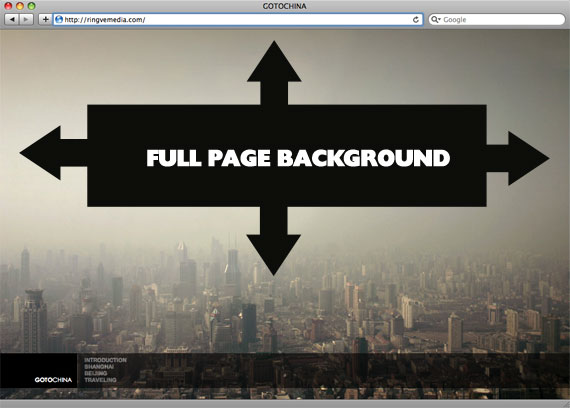
CSS trick to cover with perfect background width and height


There is one cool trick to fill place with background, even if their sizes different. Just use the code for css:
body {
background-image: url(bg.jpg);
-webkit-background-size: cover;
-moz-background-size: cover;
-o-background-size: cover;
background-size: cover;
}

The goal here is a background image on a website that covers the entire browser window at all times. Let's put some specifics on it:

  • Fills entire page with image, no white space
  • Scales image as needed
  • Retains image proportions (aspect ratio)
  • Image is centered on page
  • Does not cause scrollbars
  • As cross-browser compatible as possible
  • Isn't some fancy shenanigans like Flash

We can do this purely through CSS thanks to the background-size property now in CSS3. We'll use the html element (better than body as it's always at least the height of the browser window). We set a fixed and centered background on it, then adjust it's size using background-size set to the cover keyword.

Works in

  • Safari 3+
  • Chrome Whatever+
  • IE 9+
  • Opera 10+ (Opera 9.5 supported background-size but not the keywords)
  • Firefox 3.6+ (Firefox 4 supports non-vendor prefixed version)

Source: http://css-tricks.com/perfect-full-page-background-image/

The article can also mean: css tricks

Saturday, April 2, 2011

htaccess doesnt work on windows of xampp [Solved]


My situation: I have xampp and perfectly working website. And problem is that site does nothing, while changing htaccess.

Here is solutions for this:

  • go to xampp folder and search for httpd.conf in apache/conf folders.
  • open it
  • make sure that LoadModule rewrite_module modules/mod_rewrite.so is uncommented
  • find all AllowOverride and changed None to All. All AllowOverride!!! There should be 3 of them..
It worked for me.. and might help you.

Happy htaccess editing!

Thursday, March 31, 2011

Search folder and subfolders in text files for a string


While developing on new project which was created not by you, the software always is good for searching something..
Big plus of the software is that it is searching in sub directories... and it searches in text files! And most important it works just great!

Searches text files for strings and combination of strings. Has useful or / and / and not search combinations, and can also use regular expressions. New in version 3, is the built-in viewer / editor that highlights the matched strings and lines.

URL: http://www.sadmansoftware.com/

Friday, February 25, 2011

Hidden new line in string PHP


I guess you seen the problem, or maybe facing with it at the moment. So if you echo the string with pre tags, it will show normally. But without pre tags, it shows ugly... just like a plain text.

The problem is that there is hidden new lines symbols like /r or /n and so on...

Just by replacing the with str_replace is not enough. So here solution for it:

$value = preg_replace('/[\r\n]+/', '\n', $value);
echo htmlentities($value);

Thursday, February 17, 2011

How to test your hardware for problems

To find problem in your hardware you need to test everything... But you need to think... I mean, if windows loads up it means that video card, hard disk, rams, and so on works... Possible case - they works not good as "good", but they still works.

Anyways..

Here is some list of programs and other tricks i found while searching internet how to test your hardware parts.

Ram ( Random Access Memory ):
To test your RAM, you can do just by checking your Task Manager ( Performance tab ). Also you can see how many rums installed by going to "my computer"'s properties.
In harder cases people recommend to download these programs:
Most of the information was fount on ehow.com

Hard Disk ( Hard Drive ):
Most of test which you can do for your hard drive is installed in windows. It called "checkdisk" or chkdsk.exe, you can run it from command line. In other case you can do that from your file explorer:
  1. Go to computer, 
  2. Select hard drive
  3. Open properties
  4. Choose tools tab
  5. Press "Check Now" button, in "Error-checking" section
  6. In showed up windows check all possible check boxes and press Start.
  7. Wait until finishes and press Done. 
Also you can test your hard drive with SeaGate tool ( http://www.seagate.com/www/en-us/support/downloads/seatools ). 16,7 MB

Funny part of this, is that you can listen for sounds which hard drives are making ( in case if it is still working ), and check if it matches one of these ones: http://datacent.com/ . If it does,... i guess you need to change it.

More useful freewares such as "Hitachi Drive Fitness Test" or "Samsung HUTIL" and so on... can be fount here: http://pcsupport.about.com/

GPU ( Graphic Process Unit ):
First of all windows has included tool for this - dxdiag . You can run it from Command line.
  1. Press Start 
  2. Run 
  3. Cmd.exe 
  4. dxdiag 
  5. hit Enter
  6. check Dispay tab, for video card information.
Most popular method to test your video card is to install and run one of Benchmarks product 3DMark. http://www.futuremark.com/

Motherboard:
If motherboard is not working properly you will notice it. Some of these facts says about it:
  • Computer does not boot, and instead gives beep sounds.
  • Computer random crashes.
  • Computer randomly reboots.
and so on..


One of great software to test motherboard is Hot CPU Tester.

Saturday, December 18, 2010

Movie Maker in Windows 7


As you noticed windows 7 doesn't has movie maker included . So if you still need it, you can download and install it, just by follow step-by-step below.

1. Open http://explore.live.com/windows-live-essentials
2. Click Download now
3. It will download wlsetup-web.exe . Run it and download / installation process will start.
4. Wait until it finish

5. Done.


Happy movie making!

Sunday, November 14, 2010

How to install ipa files on ipod touch or iphone


If you wondering how to install ipa files on your ipod or iphone just follow the tutorial.

1. First of all, you will need to jailbreak your ipod or iphone. To do that follow the tutorial: jailbreaking-41-ipod-touch-2g
2. Next you need to update all files with Cydia which will appear on your ipod or iphone after you jailbreak it.
3. Next make sure you synchronize your ipod or iphone with your iTunes. Make sure you have at least one application which is not default one. Other wise application tab will not appear in your iTunes.
4. Open cydia.
5. Go to manage and add http://cydia.hackulo.us source ( Manage>Sources>Edit>Add )
6. Search for "Appsync" application for current firmware and install it. ( Search>Appsync>Install>Confirm )
7. Than just download you needed one ipa file from internet.
8. Drag the ipa file to your iTunes application section.
9. Synchronize new content with your ipod or iphone.
10. Done.

Saturday, November 13, 2010

How to watch mkv files


Mkv files are video or audio which you can play. If you see the file as unknown extension than all you need to follow the tutorial for windows:

1. Download CCCP from CCCP (Combined Community Codec Pack) Project
2. Install it
3. Done

Jailbreaking 4.1 ipod touch 2g


I have ipod touch 2g, and today i was forced to do jailbreak again.

Anyways here is very good video on youtube which shows how to do it in very easy way


To do jailbreak for your ipod touch all you need is:
1. to download Redsn0w for Windows from here
mediafire redsn0w
Or here: rapidshare redsn0w

Mac version: http://www.iphone-hacks.com/download.php?id=263

2. to download firmware 4.1 for your device...
in my situation is ipod touch 2g firmware - appldnld.apple.com ipod touch 2g
in your situation it can be ipod touch 3g - appldnld.apple.com ipod touch 3g ( if you don't know which generation you have, than i recommend you to check the article - difference-between-ipod-touch-mc-and-mb )
or even iphone - appldnld.apple.com iPhone4

3. to run redsn0w
4. follow instructions
5. done.

Wednesday, May 13, 2009

RSS notification [Windows]


Many hours i searched for RSS notificator such nice notificator as
google talk
. But there is no program which looks so good as google talk client. The problem is that google talk notifies us only about new mails.

And.. finaly I found it! I was amazed that i didn't need to install anything.

Anothr@gmail.com!

Anothr@gmail.com is a bot which will send you RSS feeds by google talk client.
"- 1" , to delete first rss in your list
"Input URL http://pilotaz.blogspot.com/feeds/posts/default", to add pilotaz.blogspot.com feed to your list
"List", to show your List
"?", to request a help.