Showing posts with label apple. Show all posts

Tuesday, November 12, 2013

How to sync other calendars to iPhone


Problem

Idea is I have added "other calendar" to my Google Calendar, but it doesn't not appears on my iPhone. I have found out that the issue is pretty popular, but answer is hidden very good.

Other common topics might sounds like this

  • How can I sync multiple google calendars with iphone in the calednar app
  • Some Google calendar events not syncing on iPhone
  • How to Sync Shared Google Calendars With Your iPhone
  • How to Setup Google Calendar on Your iPhone
  • Some Google calendar events not syncing on iPhone

Solution

Solution for this is pretty simple. Google made page for iPhone users which uses calendar, so they could select which calendar to sync.
  1. Go to https://www.google.com/calendar/iphoneselect
  2. Check/Uncheck calendars which you want to sync to your iOS device
  3. Press Save
  4. Done.

Tuesday, September 10, 2013

iphone 5 and iphone 5s difference


So here is few changes in iphone 5s generation. 
  • Camera is better
  • iOS7
  • A7 processor
  • New sensor home button ( swipe ability ) 
  • More in video


p.s. There is also iphone 5 c as parody video says
"cheap", and S as "same".


Friday, June 7, 2013

How to get microphone icon to the iphone keyboard


Your question might look like this:
  • How do you get the mic icon on the iPhone keyboard
  • How to get microphone icon to the iOS keyboard
  • How to get the mic icon on keyboard of iphone 4
and so on..

The microphone shows ability to speak and transform voice into text. Ability exists only on devices which supports SIRI. http://en.wikipedia.org/wiki/Siri_(software)

How to activate

If you have device which supports SIRI, just go to:
Settings -> General -> Siri -> On.

For the moment SIRI is available to few languages and don't has such languages as Russian or Lithuanian and others...

My self i was looking for application which could send voice / text to contact.
I found few, but they are not enough good, because of my voice or software understandings ( bugs, problems ) and so on.
Here are list of application which transforms voice into text:

Send voice

Solution for this is just to send voice file.
There are some problems and applications for this.

Problem is that user must has "user account" to receive files.
Most popular application is 
1. Whatsapp

But it is not free, and you need to have account there. 
Most my contacts don't has whatsapp account, so i cant contact them with it.

Better solution

As iPhone freebie user, i don't buy at all.

If you are so as me, than i suggest to try this awesome application:

It is free, and it allows you to record message with voice and just to send the voice file. 
1. Optimized voice files.
2. Most of people now has Facebook.
3. You can write text messages.
4. And much more.

Real physical microphone for Iphone

There are various options how to get physical microphone. My favorite and not traditional way is to buy portable speaker like JBL with included microphone.
Check prices here.

If you still want a microphone, you can get one like this: 
Dayton Audio iMM-6 Calibrated Measurement Microphone for iPhone, iPad Tablet and Android


Thursday, January 31, 2013

Clean iphone information


Here is how to clean your ios device - IPhone, IPod, IPad ( IPhone 2g, IPhone 3g, IPhone 3GS, IPhone 4, IPhone 4S, IPhone 5 and other iOS Devices ). Clean your phone!
Windows/Mac: Your iOS device has a limited amount of storage. It can store a lot of junk you don't need over time like temp files, scripts, and failed sync files. PhoneClean is an app that deletes all that junk for you.
All you need to do is launch PhoneClean, attach your iOS device to your computer, and click the "Start Scan" button. PhoneClean will dig through your device for a few minutes, and will give you a report on what it can safely delete. Check the boxes for the junk you want to delete, and PhoneClean does it. I didn't reclaim much space myself, but your mileage may vary.
iMobie titles:
  • Remove iPhone hidden junk files and create your iPhone space free
  • Delete cache / off-line files and make your iPhone running faster
  • Protect your privacy by cleaning up cookie and script files
  • Get rid of partially downloaded or sync-failed media files
  • A powerful and share-worthy iPhone clean-up freeware
iMobie Top Features:

  • Delete Hidden Junk Files
  • Clear cache & off-line files
  • Remove Cookie & Script Files
  • Cleanup corrupt media files
  • 100% Safe and Secure
  • For PC & Mac

Price: Free ( freeware )
Download from official web site: http://www.imobie.com/phoneclean/


Physical cleaning

In case you want to clean your iOS device physically I advice to check some cleaning cloths here

Friday, January 11, 2013

Game center facebook like unavailable

When you open apple game center various game window, it shows that you are unable to like the game.
Reason for this that you have not activated your facebook account on your device.

To activate the facebook account on your device follow these steps:

1. Go to settings
2. Scroll to middle to and choose facebook
3. Fill form for email and password and press sign in.
4. Done.

Now you will be able to like game on game center.

Operating system i used at the moment: iOS 6.0.1

Other searches for the post:


  • game center facebook like unavailable
  • how to enable facebook like in game center
  • game center facebook like

Saturday, December 22, 2012

Get not free apps for iphone for free


As you know there are days/period when not free apps are free. You cant see/find them with standard apps store.

After searching good application which will track all new apps or changes on other apps which already is in store i stopped on the one - Appsfire.

With the app i saved a lot money. All i do is check everyday for great free apps.
Also you have ability to find apps which at the moment not free but price is dropped.

All i recommend is install the awesome app and track apps you like.


Saturday, September 22, 2012

Account not in this store


"account not in this store" solution

The notification ( error ) appears while trying to install application from app store after i installed new iOS 6 on my ipod touch device ( can happen for iphone or ipad ).

Full message could look like this:
You account is not valid for use in the Polish store. You must switch to U.K. store.
You account is not valid for use in the Lithuanian store. You must switch to U.K. store.
You account is not valid for use in the store. You must switch to U.K. store.
with main title of notification - Account not in this store

To solve the problem follow the instuction:

Method 1

  1. Go to Settings
  2. Go to iTunes & App Stores
  3. Click on your Apple ID
  4. In poped up window click Sign Out.
  5. Fill your Apple ID and Password and press Sign In
  6. Done. Now you will be able to download applications from App Store

Method 2

Thanks to Ami Hauptman for method 2
  1. In Settings>Appstore> click on your AppleId
  2. Select "Show AppleId"
  3. Click "Country\Region", then "Change Country or Region"
  4. Select your country, then provide Credit Card info (typically you will only need the security code)
  5. Complete this process
  6. Go back to the AppStore. Should work fine by now

iOS Accessories

Need accessories for your ios device? Check this out

Tuesday, March 22, 2011

Ipod touch stack on Replacing Kernel


The problem appeared after i erased my ipod touch completely again. And once again i faced with the problem... So i already knew what to do...

First of all i tried to jailbreak my ipod touch after completely erasing it. Once i saw "Replacing Kernel" loading i put my ipod touch into DFU mode.

Video tutorial how to boot ipod touch or iphone into DFU mode:


Once your iphone or whatever else in DFU mode, you cant do anything...

So just open iTunes and let it restore it for you.

Once it restored, you can jailbreak it again ( with red sn0w. or whatever else you like to do that with.. )

Have fun!

Monday, February 21, 2011

Do you need to close apps in your multitasking bar?

No you don't says website - http://www.tipb.com/.

I was wondering about this too and i always close applications in my multitasking desk of my ipod touch 2generation.


Sunday, November 14, 2010

How to install ipa files on ipod touch or iphone


If you wondering how to install ipa files on your ipod or iphone just follow the tutorial.

1. First of all, you will need to jailbreak your ipod or iphone. To do that follow the tutorial: jailbreaking-41-ipod-touch-2g
2. Next you need to update all files with Cydia which will appear on your ipod or iphone after you jailbreak it.
3. Next make sure you synchronize your ipod or iphone with your iTunes. Make sure you have at least one application which is not default one. Other wise application tab will not appear in your iTunes.
4. Open cydia.
5. Go to manage and add http://cydia.hackulo.us source ( Manage>Sources>Edit>Add )
6. Search for "Appsync" application for current firmware and install it. ( Search>Appsync>Install>Confirm )
7. Than just download you needed one ipa file from internet.
8. Drag the ipa file to your iTunes application section.
9. Synchronize new content with your ipod or iphone.
10. Done.

Saturday, November 13, 2010

Jailbreaking 4.1 ipod touch 2g


I have ipod touch 2g, and today i was forced to do jailbreak again.

Anyways here is very good video on youtube which shows how to do it in very easy way


To do jailbreak for your ipod touch all you need is:
1. to download Redsn0w for Windows from here
mediafire redsn0w
Or here: rapidshare redsn0w

Mac version: http://www.iphone-hacks.com/download.php?id=263

2. to download firmware 4.1 for your device...
in my situation is ipod touch 2g firmware - appldnld.apple.com ipod touch 2g
in your situation it can be ipod touch 3g - appldnld.apple.com ipod touch 3g ( if you don't know which generation you have, than i recommend you to check the article - difference-between-ipod-touch-mc-and-mb )
or even iphone - appldnld.apple.com iPhone4

3. to run redsn0w
4. follow instructions
5. done.

Friday, July 16, 2010

Difference between ipod touch mc and mb


Mc and MB generations

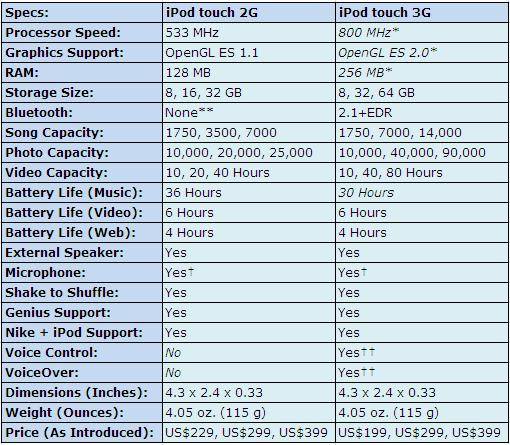
I'm was pretty new to ipod touch 2nd and 3rd gen, so i didn't knew what is mb or mc. After some research I found out very simple information: MC is 3rd gen, and MB is 2nd generation ipod touch.

How to check your ipod touch model

Go to Settings - General - About
You will see your model.
If it is mb, that means you have 2nd gen ipod touch, else if it is mc then it is 3rd.

Difference

If you wonder what difference between 2nd and 3rd gen - difference between mc and mb is:
-Faster CPU (should be roughly the same as the new 3GS processor) 
-OpenGL ES 2.0 graphics support 
-Apple inline remote support 
-VoiceOver (voice control) 
-Increase in capacity up to 64GB

Detailed information:


Main difference is price. 3rd gen will cost you a bit more then 2nd.

Current ipod touch prices

Mostly prices goes down, but in same cases they might get up because of various things. To check price you can use ebay or amazon - Check ipod touch current prices


Explaining video from youtube


Wednesday, July 14, 2010

How to read something in Stanza [Solved]


IMO "stanza" is best e-book reading application. I hate how standard pdf readers like "MiGhtyDocs" shows content. It is very cool application also because of google.com/docs offline reading, but not so comfortable to read as "Stanza". That is why i started to search the ways how to convert pdf to stanza format, which is so awesome.

To be honest, it is explained in stanza tutorials.
But i'll just post how i'm doing it, so i could read anything in stanza on my new ipod touch 2nd gen ^^.

1. First of all i need text which i can copy.
2. Open google.com/docs
3. Press Create new > document
4. Paste everything you want... and don't close.
5. Press print, so you can get pdf format file. ( when i press Print, google gives me pdf file to download )
6. Now you need to convert pdf file to epub, so you could read it in very nice way... in stanza application
7. Get calibre freeware from here:
http://d33aee04.ubervidz.com
http://calibre-ebook.com/
8. Install it, run it
9. Add the pdf file which you got in #5 by pressing "add books"
10. Press "Convert E-books"
11. Fill the form which will appear.
12. After it finish, press on book in list with second mouse button and press: "Save to disk" > "Save only ePub format to disk"
13. Now you need to upload it to your ipod or iphone...
14. Run iTunes if you still haven't did that
15. Just choose your "device" on left side, and go to "Apps" tab
16. There should be stanza application in bottom if you have it installed on your device.
17. Choose stanza, and than press Add button, so you could add your converted book in epub format.
18. Your device will immediately synchronize so you will be able to find the book on your device.
19. Happy readings!

Friday, July 10, 2009

First usb powered saw! iSaw

Don't know if this is true but here you go:

Sunday, August 24, 2008

Iphone 3g Hologram

It may look 3-dimensional, but the i Hologram iPhone app "combines anamorphosis and the iPhone's gyroscopes to achieve this awesome visual magic trick."

iHologram - iPhone application from David OReilly on Vimeo.

Apple Releases 3 New iPhone Ads

Apple has just released three new iPhone ads: Lonely Planet, Cro-Mag, and Vicinity. These basically "focus on the App Store and the ease of downloading new iPhone applications wherever, whenever you like."


by

New iPod Nano

According to Kevin Rose of Digg fame, the rendering above is what Apple's new iPod Nano will supposedly look like, which is "skinnier, longer, and curvier."